Global Events
Global Events
The Stack Console's Global Events tab lets you view all major system notifications or announcements. Admins can add new events by entering a title, message, selecting a category like Warning, Info, or Critical, and setting the event dates and status.
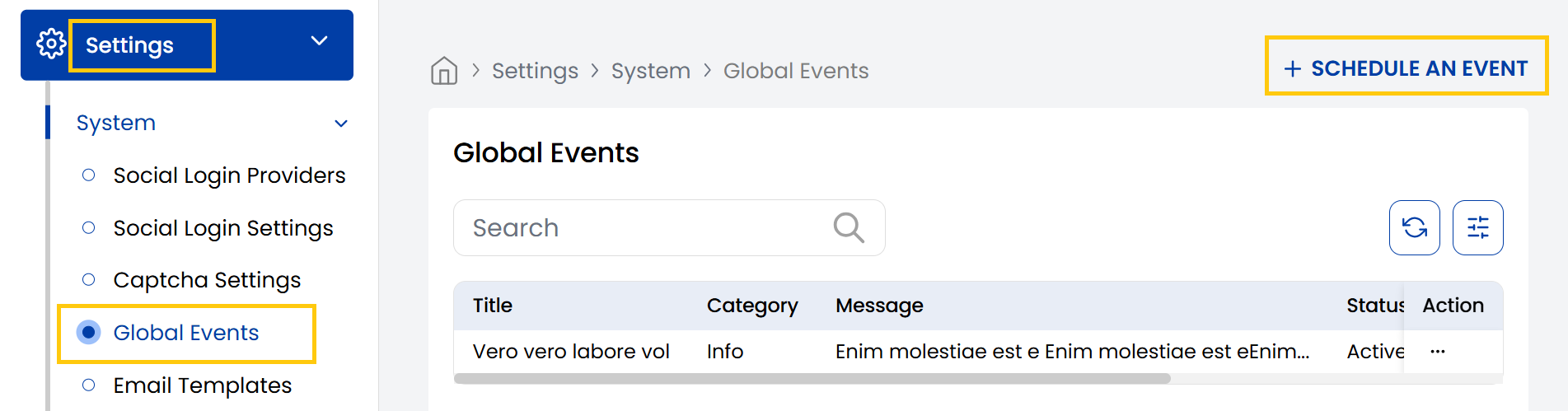
- From the left-hand side menu, navigate to the Settings tab. Under Settings, select the System option and click on Global Events.
- The Global Events page displays all major system notifications or announcements.
- To schedule a global event click on Schedule An Event.
- Give your event a title and description to show detailed message to users.
- Choose a Category from:
- Info: General information.
- Warning: Alert users but not urgent.
- Critical: Immediate action required.
- Select the start and end date of the event, set status active or inactive according to your preference and click on Submit.

Conclusion
The Global Events section enables effective system-wide communication of important notifications. For event management assistance, contact Stack Console support.